
DenchClaw
Local first AI CRM with OpenClaw, browser automation, workflow automation, and cloud or self hosted deployment options.
About DenchClaw
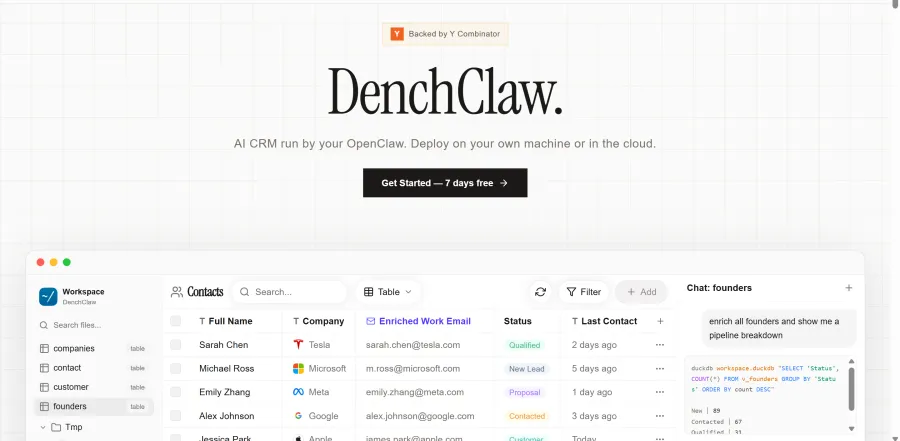
DenchClaw is an AI CRM built around OpenClaw. The official site describes it as an AI CRM that can run on your own machine or in the cloud. Dench positions the product around importing data from many sources, working with one prompt, and automating follow ups, enrichment, and reporting.
The product focuses on bringing contacts, notes, documents, and CRM records into one workspace. The website highlights import support across major tools such as Salesforce, HubSpot, Gmail, Notion, Slack, LinkedIn, Google Drive, GitHub, Sheets, Asana, Monday, ClickUp, PostHog, Apple Notes, and Calendar, with additional integrations available through its Skills Store.
DenchClaw also emphasizes local first usage and open source flexibility. The homepage states that users can self host for free, while the GitHub repository identifies the project as MIT licensed. The repository also shows local installation details, including Node 22+ and a localhost onboarding flow.
Key Features
- Multi source import: Imports contacts, notes, documents, and CRM records from many connected sources.
- Prompt based CRM actions: Supports search, updates, bulk actions, and instant answers from a single prompt interface.
- OpenClaw framework: Uses OpenClaw and supports CRM access through Telegram and iMessage.
- Workflow automation: Runs background jobs, rules, triggers, and scheduled reports for recurring work.
- Pipeline tracking: Includes kanban style pipeline tracking with automatic movement of cards as leads reply.
- Analytics and reports: Generates live charts, pipeline analytics, and markdown based reports from workspace data.
Pricing
-
Dench Cloud: $69/seat/month Fully managed cloud workspace with AI CRM, agent gateway, browser automation, and $25 free AI credits every month.
-
Free Trial: 7 days free No credit card required on the official pricing section.
-
Open Source Self Hosted: Free The official site says users can self host for free anytime.
Use Cases
- Importing CRM and contact data from multiple business tools into one workspace
- Managing outreach workflows and lead pipelines with prompt based actions
- Automating follow ups, enrichment, reports, and recurring background jobs
- Running a local first or self hosted AI CRM deployment
Pros & Cons
Pros:
-
Open source with MIT license and self hosted option.
-
Strong import story with many listed source systems.
-
Combines CRM, automation, analytics, and browser automation in one workspace.
Cons:
- Public pricing is shown mainly for the cloud plan, with limited packaged tier detail.
- Local installation requires Node 22+ and setup steps, which may add technical overhead for some teams.
Integrations
Salesforce, HubSpot, Gmail, Notion, Slack, LinkedIn, Google Drive, GitHub, Sheets, Asana, Monday, ClickUp, PostHog, Apple Notes, Calendar
FAQ
Last edited
April 1, 2026 at 6:27 AM by Venkatraman C

Similar to DenchClaw


